Make the Desk Easy to Use and Easy to Change
A tangled family-room desk often grows one connection at a time: a laptop charger joins a monitor cable, a lamp finds the nearest socket, and a temporary lead becomes permanent. Because the desk shares its surroundings with seating and household movement, a tidy bundle must work from more than the worker’s viewpoint. Someone on the sofa may see the back of the desk, while a person passing through the room encounters the route to the outlet. Give the connections an understandable system that keeps controls reachable, allows equipment movement, and supports packing away portable work. Start with the desk’s actual tasks and its place in the family room, then organize the leads so both working time and shared use remain straightforward.
Inventory the Setup Before Disconnecting It
Identify the desk’s active equipment and the connections each piece needs. Include the monitor, computer, dock, lamp, audio equipment, and charging accessories, then distinguish them from nearby television or family-device connections. Follow each lead from end to end before unplugging it. A shared outlet or a cable disappearing behind the media cabinet can make another person’s active connection look like a desk spare. Record which equipment belongs to the workstation so the cable cleanup does not disrupt the room’s viewing or charging arrangement.
Take a clear photograph of the existing connections before unplugging equipment. Use the devices’ normal shutdown procedures where appropriate and avoid interrupting a transfer or update. Keep the photograph private if it shows account information on a screen. Its purpose is to help restore the arrangement accurately, not to document every accessory you own.
Separate inactive cables from the working setup. Store useful spares elsewhere with an understandable description of what they support. Do not leave a disconnected lead under the desk merely because it might be useful someday. Fewer active cables make the route easier to understand and reduce the temptation to organize an unnecessarily large bundle.
Assign a Place to Daily Connections
Decide where the equipment belongs before attaching organizers. A dock used every morning should be reachable, while a desktop tower may need access for ports and ventilation. Consider whether moving one device closer to its connection point would simplify the route. Cable management works best when it supports a workable equipment layout.
Reserve a convenient place for the leads that must stay available, such as a laptop charging connector or occasional headphone cable. These do not belong in the same inaccessible bundle as connections you rarely touch. A suitable edge clip can keep an end from dropping behind the desk if it fits the cable properly. Test whether the connector still reaches your normal working position.
Divide the Route Into Useful Zones
Think of the system as three connected areas: the desktop, the underside, and the route to power or other room connections. Each has a different job. The top needs accessible working leads, the underside can support stable runs, and the final descent needs a safe path that avoids feet and chair movement. This division helps you decide where an organizer is useful without treating every cable as a single bundle. Keep crossings between the zones simple enough that you can trace a lead later.
Choose Organizers for the Desk Itself
Check the desk’s construction before buying a tray or mounting hardware. A solid underside, a hollow panel, and a metal frame may require different attachment methods. Follow the organizer and desk manufacturers’ guidance, especially if drilling is involved. A tidy tray is not worthwhile if its mounting damages the furniture or interferes with its structure.
Consider a clamp-mounted organizer when that method suits the desk and equipment. Check the supported edge thickness, available clamp clearance, and load capacity. Avoid assuming that a product fits because the desktop looks ordinary. Drawers, frame rails, and bevelled edges can prevent an otherwise suitable clamp from working.
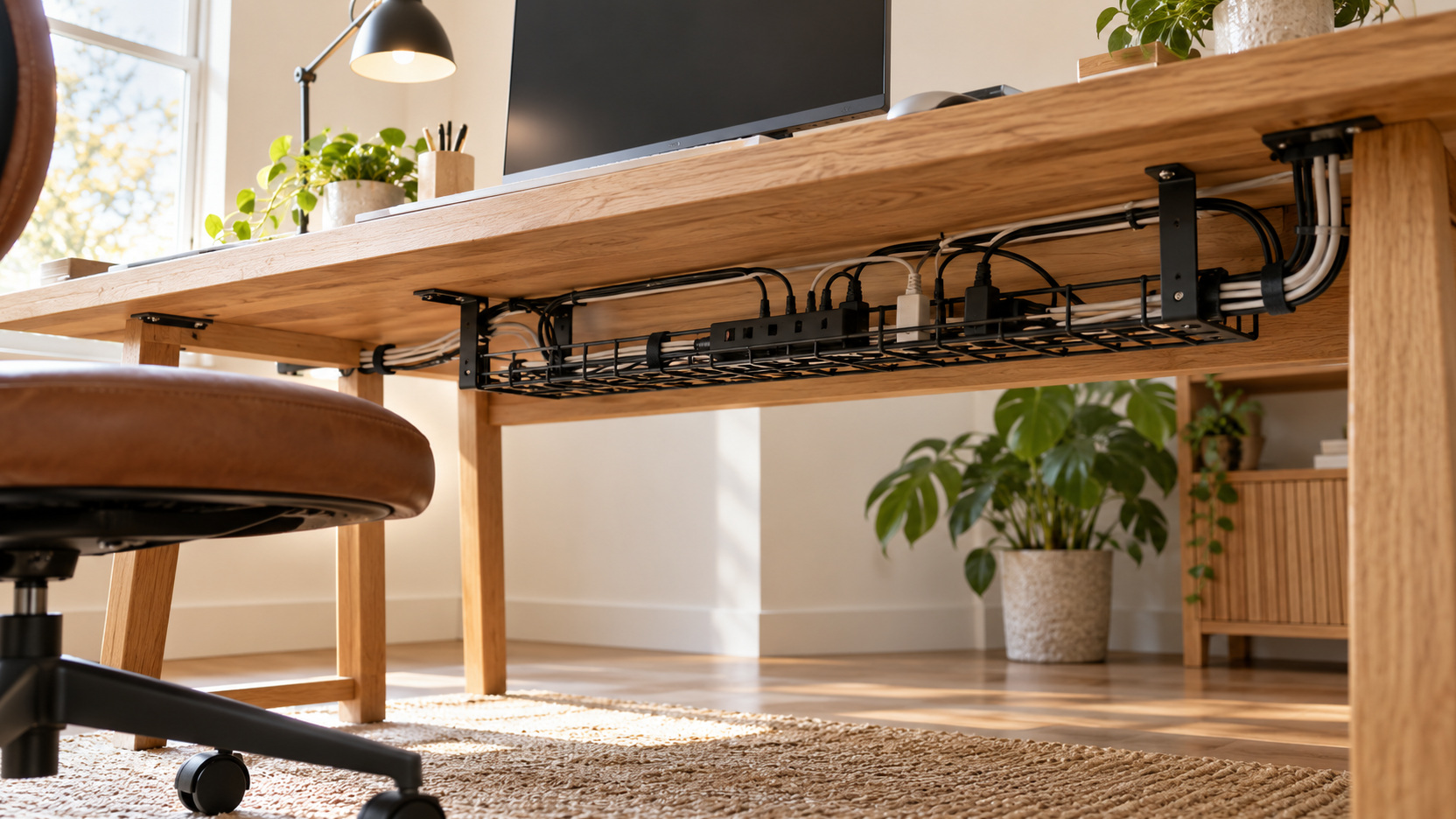
Choose a tray or support that remains accessible. You should be able to inspect the equipment it holds and change a connection without dismantling the desk. Verify what the product is designed to support, including any permitted power equipment. The organizer’s purpose is to hold an appropriate arrangement, not justify crowding heavy adapters into an enclosed space.
Establish an Appropriate Power Arrangement
List the equipment that needs electrical power and review the ratings and instructions for the power-distribution products you use. Keep the arrangement within its intended use and replace damaged items appropriately. ESFI’s extension-cord guidance advises against using extension cords as permanent wiring and against connecting multiple outlet strips together. If the desk lacks a suitable supply, seek qualified electrical advice about a proper solution.
Leave plugs and the relevant disconnecting point accessible. Concealing them should not make it difficult to stop using faulty equipment or reach a connection for maintenance. Avoid routes that pinch cords in drawers, furniture joints, or doors. A clean workspace still needs an appropriate electrical arrangement that can be inspected.
Route Stable Leads Under the Desktop
Start with cables that rarely change, such as a monitor’s connection to a stationary computer. Guide each along a supported path under the desktop while keeping it clear of moving parts. Use attachment products compatible with the surface and cable. Do not stretch the lead taut merely to make the line look straight.
Keep enough length at the endpoints to reposition equipment within its normal use. Monitor adjustment, keyboard movement, and access to a computer port all require some freedom. Support the cable so its weight does not hang from a connector. Check the route from below as well as from the seated position.
Group nearby stable runs where the products’ guidance permits, but keep them understandable. A loose, releasable wrap can be easier to maintain than a permanent fastening. Avoid tight compression, sharp bends, or a bundle that prevents individual leads from being removed. The goal is a manageable route rather than the smallest possible bundle.
Give a Sit-Stand Desk Its Full Range
A height-adjustable desk changes the distance between its moving equipment and fixed room connections. Plan the route using the desk manufacturer’s cable-management guidance and test the supported travel range. Keep cables away from mechanisms and pinch points. A connection that looks generous at seated height may become taut when the desktop rises.
Make the movement test slowly while observing the cable path and following the desk’s operating instructions. Stop if a lead snags, pulls at a port, or interferes with the mechanism. Adjust the support before resuming normal use. Do not rely on a person remembering to release a trapped cable every time the desk moves.
Control Excess Length Without Creating a Lump
Use only as much additional length as the arrangement reasonably needs. If an excessively long cable creates several bulky loops, consider a suitable shorter replacement after verifying its required specifications. Length is not the only criterion: the new cable must support the connection properly. Keep the original until the replacement has been tested.
Where excess remains, gather it loosely in an accessible supported area. Avoid wrapping it tightly around adapters or forcing it into a small gap. Keep ventilation openings unobstructed and follow the equipment’s placement requirements. Hidden storage should not become a cramped accumulation that is difficult to inspect.
Distribute larger adapters so they do not strain adjacent plugs or hang from delicate connections. A suitable organizer may support them, but check what it is designed to hold. Keep their identification accessible for future troubleshooting. Mixing several similar black adapters without a way to identify them makes later changes unnecessarily difficult.
Separate Portable Work From Permanent Wiring
A laptop that leaves the desk every day needs an easy arrival and departure routine. Position the supported dock or charging lead so it can be connected without reaching through a fixed bundle. Leave the necessary end available rather than hiding it for visual neatness. A clear parking point can keep the connector from falling out of reach.
Treat occasional peripherals as temporary connections unless the household uses them regularly. A camera, external drive, or drawing tablet may deserve a convenient access path without occupying a permanent under-desk run. Decide where it will be stored when absent. This keeps today’s temporary work from quietly rebuilding yesterday’s tangle.
Make the Floor Route Work With the Chair
Look at the desk from floor level and follow the final cable descent toward the outlet or other fixed connection. Keep that path outside chair-wheel travel and foot movement. Use a suitable support along the desk leg or frame if the equipment and furniture permit it. Avoid solving a visible drop by leaving the remaining cable loose across a walkway. If the room connection is poorly located, reconsider the desk position or seek an appropriate permanent solution before accepting a hazardous route.
Label the Connections You Will Need Later
Add discreet labels to leads that are difficult to distinguish, particularly where several monitors or adapters are involved. Identify the connected device or function rather than an arbitrary number nobody remembers. Keep labels away from hot surfaces and connector mechanisms. They should remain readable without interfering with normal handling.
Save a simple connection record when the arrangement is working. Include which port a monitor or dock uses if that distinction matters for the setup. Keep the record with the desk’s equipment information. It can help someone restore the workspace after cleaning or replacing a device without guessing among similar connectors.
Verify the Workspace Through Actual Tasks
Turn the equipment on and perform a short version of your normal work. Check the monitor, charging, sound, and any peripherals that depend on routed connections. Move the chair, adjust the monitor, and connect or remove the laptop as usual. A tidy stationary arrangement should still function when the desk is being used.
Inspect the underside after that test. Look for a lead that has slipped from a clip, a connector taking unnecessary strain, or excess length migrating toward the floor. Make small route adjustments before adding more fasteners. Often the better fix is a different support point rather than a tighter bundle.
Ask another regular desk user to try the routine. They may reveal that an accessible connector is difficult to reach from their seating position or that a tray obstructs their knees. Adjust for the people sharing the workspace. Cable organization is successful when it reduces daily friction as well as visible clutter.
Share the Workspace Without Rebuilding It
A shared desk needs a clear handoff between users. Agree which leads remain attached and where portable chargers or peripherals are stored after work. Avoid making each person search beneath the desk for the same connector. A practical parking point can serve several users if it is reachable from their normal positions.
Try a complete family-room handoff rather than only a second desk user. After a laptop session, remove the portable equipment, park its connector at the desk, and let someone take a book from the nearby shelf or sit on the adjacent sofa. The lead should not migrate onto the seat or fall across the shared approach. Give occasional camera and keyboard cables a small work-accessory home, separate from the television remotes. This leaves the stable desk wiring in place while letting portable work disappear without transferring its tangle to the rest of the room.
Maintain the System When Equipment Changes
Revisit the relevant route whenever a device is added or removed. Undo the appropriate releasable fasteners and restore the supported path rather than threading a new cable around the bundle. Remove obsolete connections promptly. If a desk moves nearer the family-room console, verify its own route instead of borrowing a lead from the media setup and leaving two systems entangled. Check the finished view from the sofa and the approach to both pieces of furniture. A few deliberate minutes at each change keep the work corner serviceable and prevent temporary desk connections from spreading into the shared seating area.